Scenario Experience

Join CommunityConnect with users →
Join AskTable Community


Feishu
Choose your preferred way to join

Contact UsGet professional support →


Alibaba Cloud OffersScan for offers →

Scenario Experience
Feishu
Choose your preferred way to join
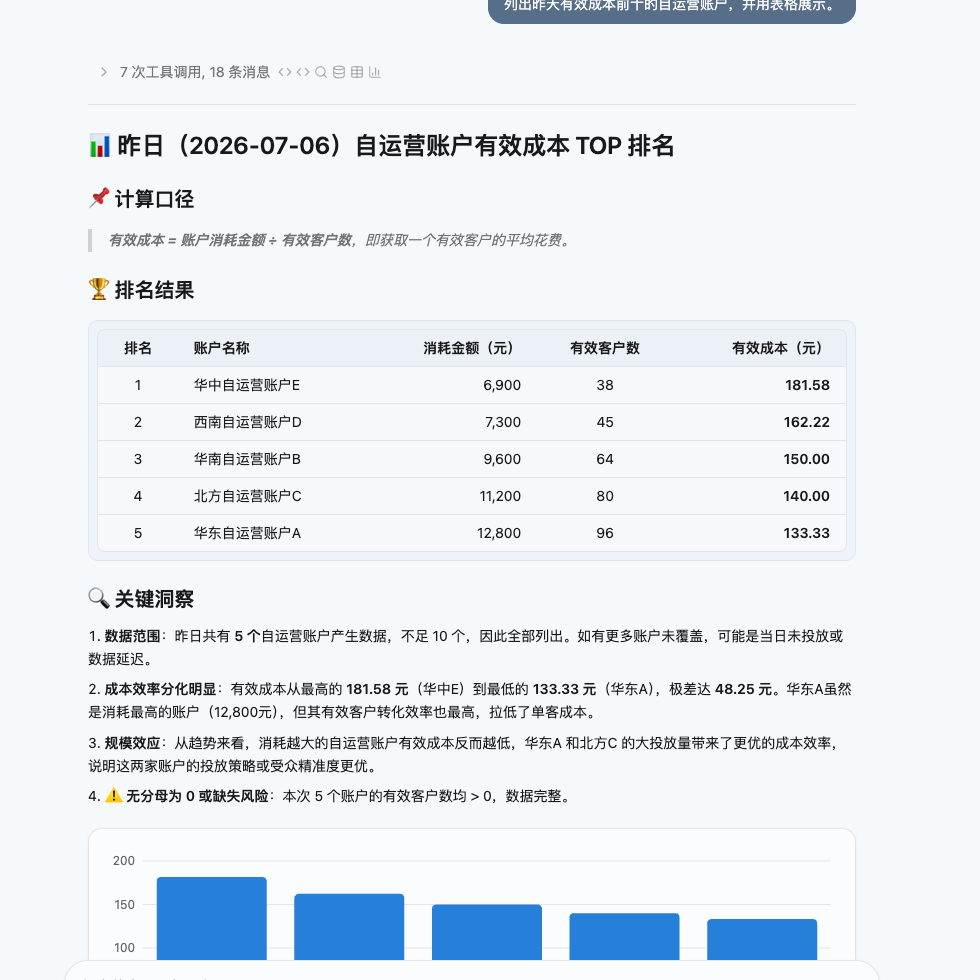
The screenshot uses synthetic demo data. The important point is not the specific numbers. It shows that AskTable can explain the calculation method first, then return a table and key observations based on the business definitions you configured.
After connecting data to AskTable, many teams ask: if the data is already connected, why does AI still need configuration?
The reason is simple: data systems usually store field names and numbers, but the real business meaning often lives in people’s heads.
For example:
account_name mean an ad account, a customer account, or a store account?AskTable needs you to tell it these things. The clearer you are, the more it can analyze according to your company’s business habits instead of guessing from field names.
This guide explains how non-technical users can configure semantic information so AskTable understands the business better.
Think of AskTable semantic configuration as five kinds of business instructions:
They are not only for technical users. They are for people who understand the business.
| Function | What to tell AI | Good content | Not suitable for |
|---|---|---|---|
| Table comment | What this dataset represents | Data scope, business object, update frequency, granularity | Complex calculation rules |
| Field comment | What one column means | Meaning, unit, enum values, null meaning | Long business policies |
| Field value index | Common names, categories, or statuses in a field | Store names, cities, channels, product categories, customer levels | Amounts, dates, long text, unique IDs |
| Business document | Company-specific business rules | Metric definitions, business jargon, cross-table relationships, formulas | A short one-line note |
| Preferences | Long-term habits for the agent | Business background, analysis style, output style | Long rules that change often |
Simple rule of thumb:
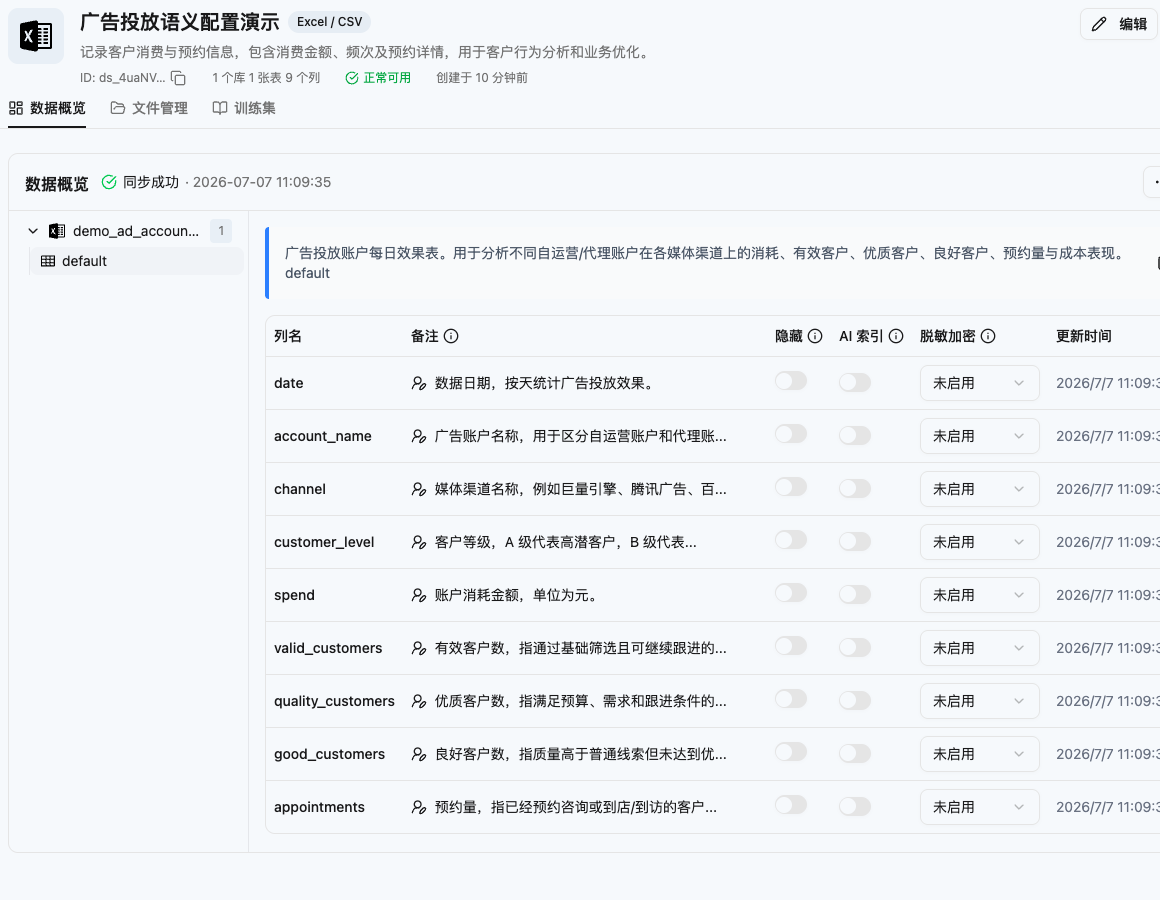
In datasource field settings, you can add table comments and field comments. For suitable fields such as account name, channel, and customer level, you can enable field value indexing so AskTable can better recognize business names and categories.
A table comment answers the question: what does this dataset represent?
For business users, a “table” can be understood as one block of business data. It may come from Excel, ERP, CRM, an ad platform, or an order system.
A good table comment should answer four questions:
Example:
Daily ad account spending
Records the daily advertising performance of each account, including spend, impressions, clicks, click-through rate, and appointments. Each row represents one account on one day. This dataset includes account performance only; it does not include customer lead levels or duplicate-application status.
This helps AskTable avoid misunderstanding the data.
If a user asks “show yesterday’s top self-operated accounts by effective cost,” AskTable can know that spend is in this dataset, while “effective customers” may need to come from another lead dataset.
Field comments explain what a column really means.
Many field names are friendly to systems but not clear enough for analysis, such as:
costgmvvalid_cntaccount_namestatussourceWrite field comments in business language.
| Field | Recommended comment |
|---|---|
| account_name | Advertising account name, used to join with the customer lead dataset |
| media | Media channel, such as Tencent Ads, WeChat Channels, or Ocean Engine |
| spend | Daily ad spend of the account, in yuan |
| appointment_count | Number of customers who made an appointment that day |
| customer_level | Customer star level; 2-star-plus, 3-star, and 4-star can be used to judge customer quality |
| duplicate_status | Whether the lead is a duplicate application; duplicates are excluded from effective customers |
Clear field comments help AI choose the right fields and explain results.
They are especially useful for:
A field value index lets AskTable remember common business values in a field.
Users may ask:
These questions include concrete names: stores, channels, customer levels, and accounts. AskTable needs to know how those names appear in the data.
Good fields for value indexing include:
Fields that usually should not be indexed:
The reason is simple: value indexing is for a limited set of business names. If a field is numeric, date-like, or nearly unique per row, it is not a good fit.
Business documents are for knowledge that cannot be explained in one or two sentences.
For example:
A business document usually has four parts:
| Item | How to write it |
|---|---|
| Title | Make the topic clear at a glance |
| Description | Summarize what the document explains |
| Body | Write the full business rule, formula, and notes |
| Keywords | Add words users may ask with, so the document is easier to match |
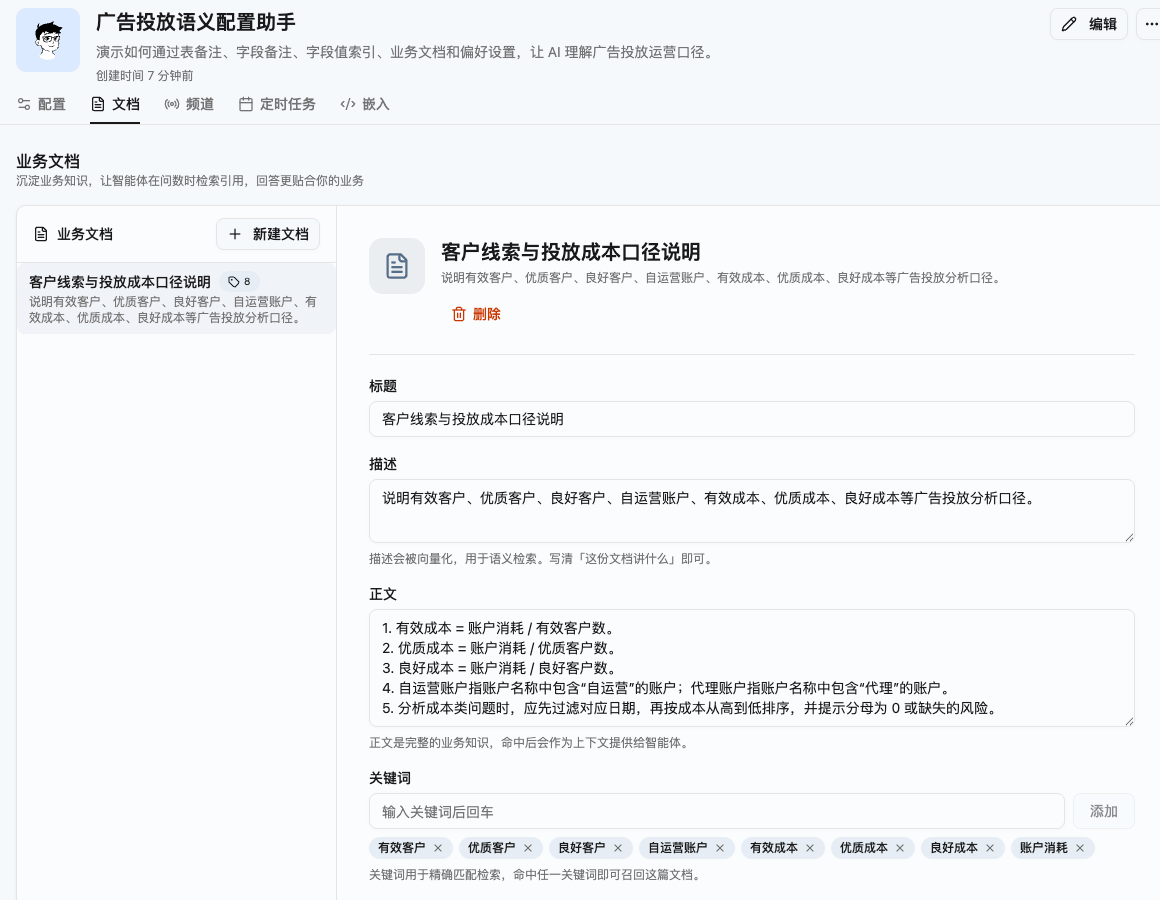
A business document is the right place for complete metric definitions, keywords, and calculation rules. When users ask about “effective cost” or “high-quality customers,” AskTable can use these instructions to understand the question.
Preferences are configured on the data agent. They usually include two parts:
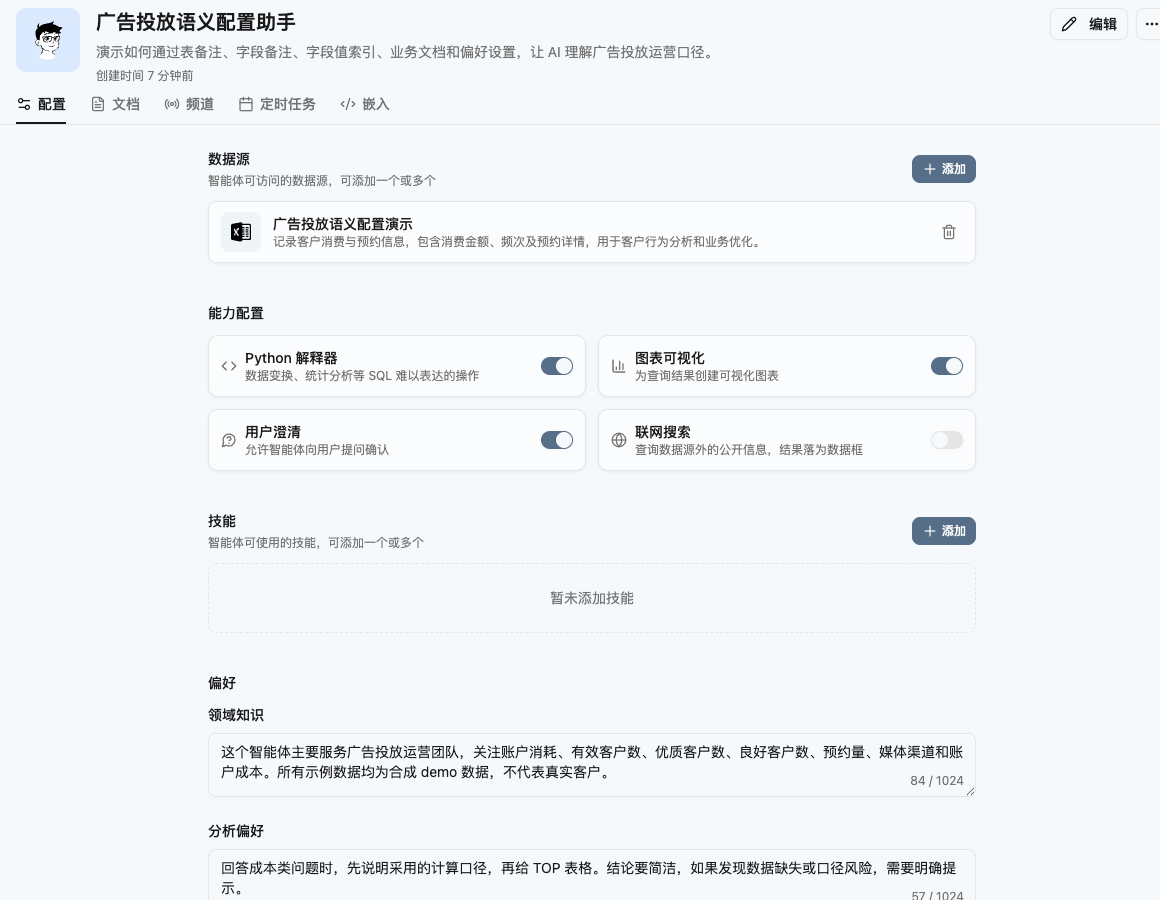
Domain knowledge is stable business background the agent should remember.
Example:
This agent mainly serves the advertising operations team. It focuses on account spend, effective customers, high-quality customers, appointments, media channels, and account cost. When analyzing, distinguish self-operated accounts from partner accounts.
Analysis preference explains how you want AI to answer.
Example:
For cost-related questions, first explain the calculation definition, then provide a TOP table. Keep the conclusion concise. If data may be incomplete, clearly mention the risk.
Preferences are best for short and stable habits. Long business definitions should be maintained in business documents.
Suppose an operations lead asks:
List yesterday’s top self-operated accounts by effective cost and show them in a table.
To make AskTable answer reliably, configure the semantics in this order:
account_name, spend, media, customer_level, and duplicate_status.account_name, media, and customer_level.With these settings, AskTable can understand that:
Only writing field names, not business meaning.
Bad: spend: cost. Better: spend: daily ad spend of the account, in yuan, used to calculate acquisition cost.
Putting long rules into field comments.
If a rule needs several sentences or multiple datasets, use a business document.
Enabling value indexing for every field.
Only index names, categories, and statuses that users will say directly.
Making preferences too long.
Preferences are for stable habits. Complex definitions belong in business documents.
Writing business documents without descriptions or keywords.
Descriptions and keywords help AskTable find the right document when users ask questions.
Start with the most important datasets and add table comments first. Then add field comments to key fields. Enable value indexing for stores, channels, accounts, categories, and customer levels. Put metric definitions, jargon, and cross-data relationships into business documents. Finally, define the agent’s business background and answer style in preferences.
After launch, use five to ten real business questions to test the setup. Every time AI misunderstands something, turn the reason into configuration:
AskTable semantic configuration is not about making business users learn technology.
It is about putting the business knowledge you already understand into the right place, so AI can move from “querying data” to “understanding business.”
No coding required. Ask questions in natural language and AI generates SQL queries and visualizations automatically.
Start your free trial now and experience AI-powered data analysis with AskTable.